
Microsoft OneDrive Share Settings: Editing and Downloads
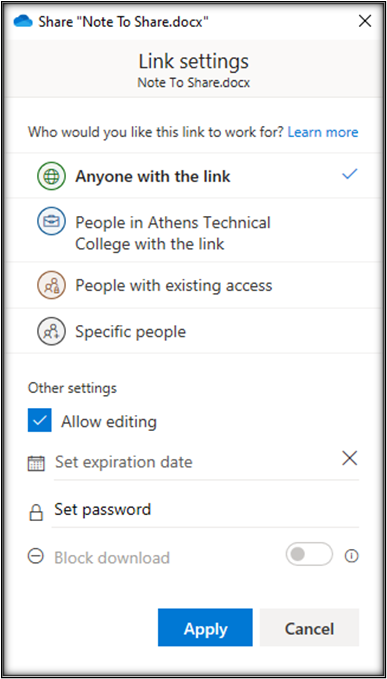
The settings for this file are
- Anyone with the link can access.
- Allow editing.
Therefore, anyone with the link can edit the shared file. The Block Download option is grey, which means that the file can be downloaded by anyone with a link so the person can edit the file. Anyone with the link creates a link that any person can use to access the file or folder without signing in to Microsoft 365 or OneDrive. This link can also be forwarded to anyone, so use it when you want to share with people and are comfortable with them passing the link around to other people, inside or outside your organization (Microsoft, 2020).
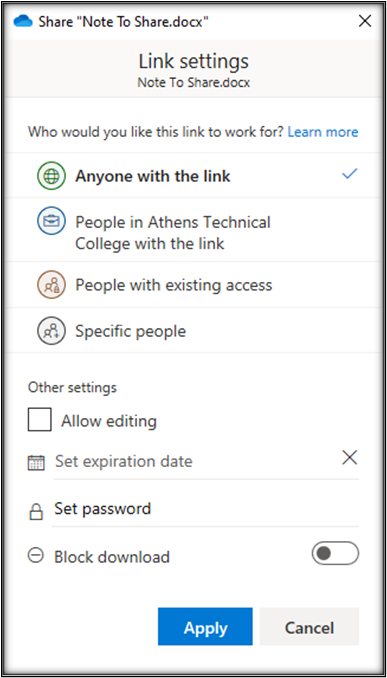
The settings for this file are
- Anyone with the link can access.
- Cannot edit.
Therefore, anyone with the link can view (not edit) the shared file. The Block Download is not greyed out, which means that the file cannot be downloaded. Block download is available for view-only links to Office documents. When you select this option, people who gain access to the file via the link you created will not see options to download, print, or copy the file. They'll also only be able to view the file in Office Online and will not be able to open the file in Office desktop or mobile clients (Microsoft, 2020).
Additional Information and Technical Support
Additional information is available in the solution article Upload Error and from Microsoft Support Sharing files, folders, and list items.
For further assistance, please submit a Blackboard Support Request.