
Check the Simple Syllabus Library
- Log into Simple Syllabus from OKTA or from the Start Here module of the Blackboard course.
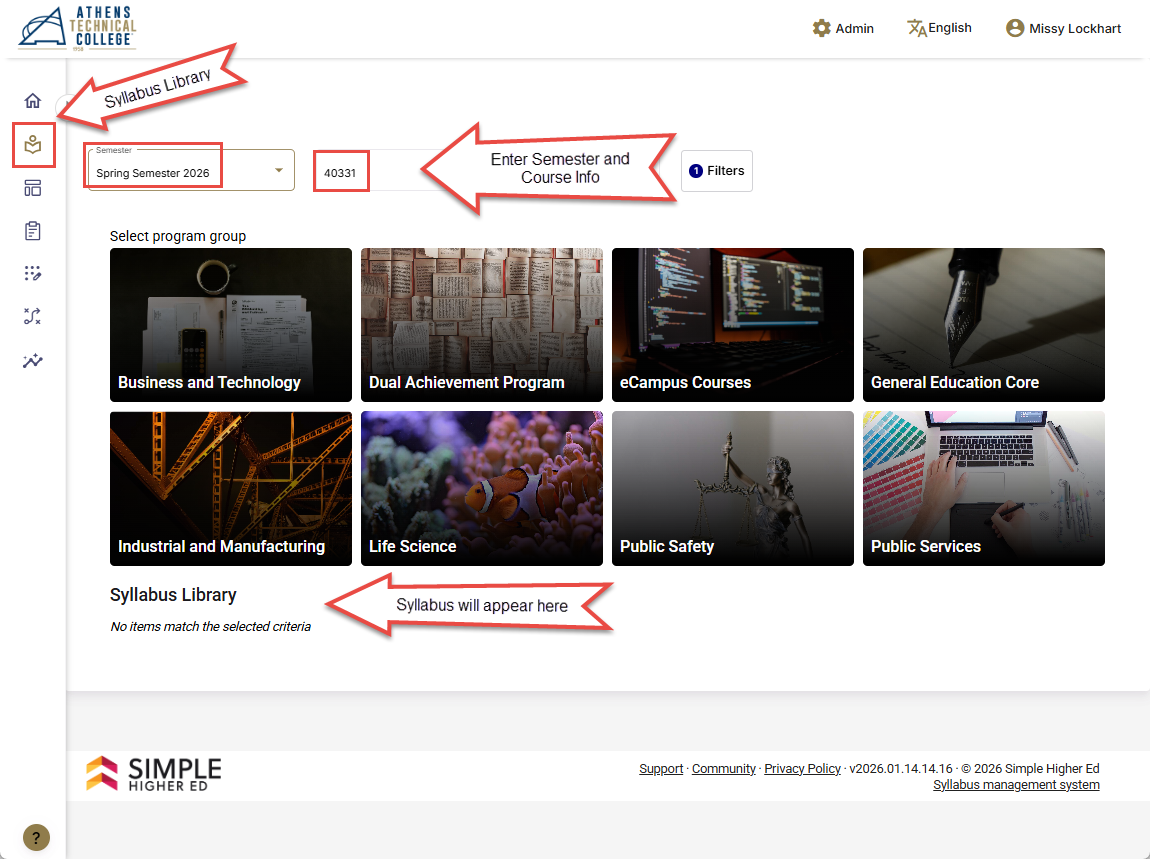
- If logging in from OKTA, choose the Syllabus Library icon in the left-side menu (image shown below).
- If logging in from the Start Here module of the Blackboard course, choose the Syllabus Library link in the left-side menu.
- Enter the CRN or subject and course number in the search field.
- The syllabus will appear below the program group pictures.
Technical Support
Submit a Blackboard Support Request from your OKTA Dashboard with questions about Simple Syllabus.
More information
Detailed information is available in the Simple Syllabus solution article series:
- Simple Syllabus Overview
- Simple Syllabus Level-1: College-Wide
- Simple Syllabus Level-2: Master Syllabi
- Simple Syllabus Level-3: Course Syllabus
- Simple Syllabus: Building the Syllabus
- Simple Syllabus Student View
Athens Technical College, Center for Teaching and Learning Last update: 01/16/2026